
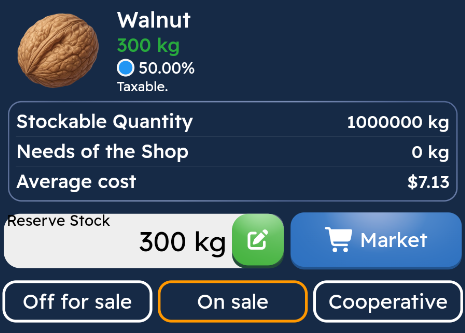
Reserve Amount is a feature used to prevent a portion of the products in your logistics warehouse that you specify from being sold to other players.
Products set as reserves continue to be sent to your stores, but cannot be put up for sale to other players through the logistics warehouse. This way, you can secure a certain amount of products for your own stores.
What is Reserve Amount Used For?
When you set a reserve amount, the system protects the amount you specify only from logistics warehouse sales. This way, while your products can be shipped to your stores, the reserve amount is taken into account in sales to other players.
Example
Suppose you have 1,000 units of Walnut in your logistics warehouse and you set the reserve amount to 300 units.
In this case:
700 Walnuts, can be sold to other players through the logistics warehouse.
300 Walnuts are kept as a reserve in the logistics warehouse and cannot be sold to other players.
However, these 300 Walnuts can continue to be sent to your stores when needed.
When Should Reserve Amount Be Used?
It is recommended to use the reserve amount in the following situations:
If you don't want your stores to run out of products,
If you want to keep certain products in stock for your own sales network,
If you want to prevent all your inventory from being sold through the logistics warehouse,
If you are continuously shipping to stores and want to maintain a safe stock level.
Important: Reserve quantity only limits sales to other players through the logistics warehouse. Products set as reserve can be sent to your stores and continue to be used within the normal game flow.